AI SEARCH VISIBILITY · SOURCE-VERIFIED REVIEW
Peec AI Review: Pricing, Features and a Practical GEO Verdict for 2026
Peec AI is no longer just a place to watch brand mentions. Its current platform connects daily monitoring, source intelligence, prioritized Actions, an Agent and content editing. The buying question is whether that workflow helps your team deliver better work—and whether the included models, projects and usage allowances cover what you actually need.

Lead SEO & AI Specialist · 13+ years in SEO
Published & fact-checked November 21, 2026 · 18 min read
In this review
The short answer: shortlist Peec AI for an evidence-to-action workflow
Peec AI is worth evaluating if you want daily AI-search monitoring that leads to source-level research and specific content, technical or outreach tasks. The visible brand pricing makes capacity easier to scope, and the current Agent and editing tools go beyond passive reporting. It is less compelling if your team will only look at the dashboard and never act.
- Best fit
- Marketing/SEO teams and agencies with an owner for analysis and implementation.
- Current entry plan
- Starter $95/month: 50 prompts, three models, one project and daily tracking. [1]
- Useful combination
- Raw answers + sources + Actions + reviewed content drafts.
- Main caution
- Available models exceed the three included active models; tracking capacity and Agent credits are separate.
Evidence note: This is a public-documentation review, not a paid-account benchmark. We have not independently tested collection accuracy, support quality or revenue lift. No invented score, interview or customer outcome is used.
What is Peec AI—and what does it measure?
Peec AI is an AI-search platform for tracking how brands and products appear in generated answers, investigating the sources behind them and organizing improvements. The current pricing and documentation cover brand analytics, prompt suggestions, source analytics, shopping, perception/fact-checking, Actions, content optimization and own-site analytics. Calling it “analytics only” now misses documented parts of the product. [1] [5] [6]
GEO (generative engine optimization) and AEO (answer engine optimization) overlap around making accurate, useful information discoverable in AI answers. Peec does not control those answers. It runs a selected sample of questions, measures responses and provides evidence to guide work.
The essential distinctions are mentions, retrieved sources, explicit citations, prose links and referred visits. A brand can be mentioned without a link; a retrieved page may never be cited; a citation may not generate traffic. Peec’s documented separation of those signals is more useful than treating them as a single “AI ranking.”
For context, read what GEO means and AI visibility vs. traditional SEO rankings.
Peec AI features in detail: where the added value is
1. Daily visibility and raw chats: start with the actual answer
The Overview combines visibility trends, brand/competitor metrics, top sources and recent chats. Filters include date, models, country, topics and prompt tags. Visibility is the percentage of responses mentioning a brand; sentiment is described on a 0–100 scale; position reflects order among mentioned brands. Raw chats show the prompt, mentions, sources, links, citations and collection time. [3]
Practical value: if visibility falls, inspect the affected model and topic before rewriting content. The brand may have disappeared from a buying shortlist, been replaced by a product alias, or appeared in fewer answers because the sample changed. A chart suggests where to look; raw answers explain what was observed.
The guide notes that prompt-tag filters do not apply to the recent All Chats section. Saved filters are personal to an account within a project, not automatically shared with colleagues. These details matter when an analyst and client believe they are looking at identical evidence.
2. Sources and query fanouts: understand retrieval before planning outreach
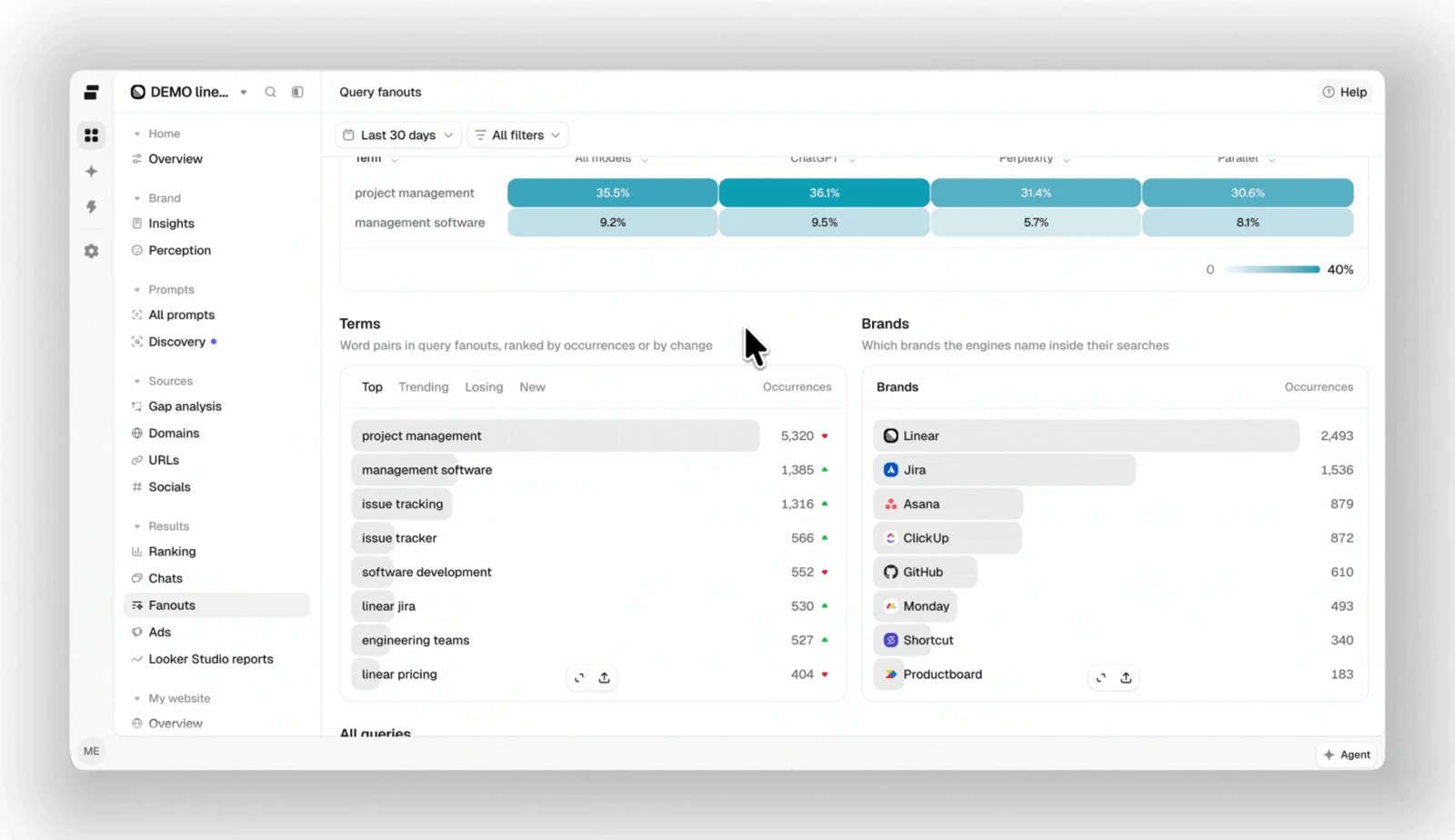
Source analysis looks at domains and URLs used in answers, with source-type classifications and drilldowns. The Overview distinguishes retrieved share, retrieval rate and citation rate. Links written into answer prose are tracked separately from retrieved/cited sources. Query fanouts expose searches an engine performs while constructing an answer, where that evidence is captured. [3] [4]
How to use it: find the specific page repeatedly associated with relevant questions, read it and decide whether the opportunity is an owned-content improvement or a legitimate third-party factual update. Do not turn “this source was retrieved” into “this source caused our recommendation.” Capture availability varies by engine and answer behavior.
3. Prompt discovery and organization: make the sample meaningful
The current table lists brand context, relative prompt volume, competitor/topic suggestions, prompts from keywords, bulk import, personas, tags and intent/brand classification. Prompt volume is explicitly described as relative demand for the topic behind a prompt, scored 1–5. It is not an exact count of everyone asking that question. [1]
Seed questions from sales, support and customer research, then use suggestions to identify coverage gaps. Keep branded and non-branded buying questions separate. A large prompt library made mostly of brand-name queries can exaggerate how discoverable you are to someone who does not already know the product.
4. Actions: a ranked work queue with evidence
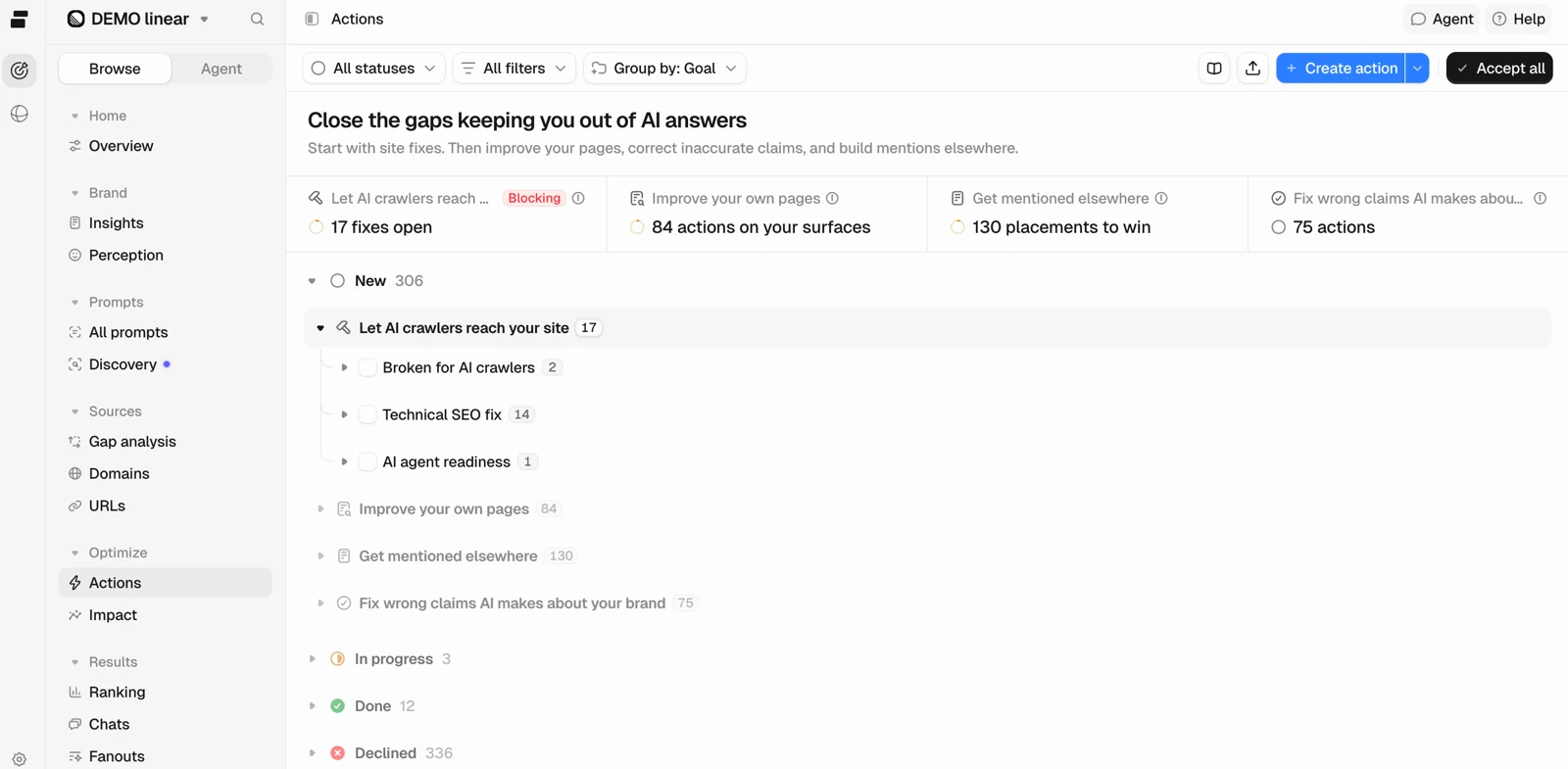
Actions organizes opportunities into technical access fixes, improvements to owned pages, mentions elsewhere and corrections to inaccurate brand claims. An action includes supporting evidence, competitor context, a brief and steps. You accept or decline it, work through it and record completion. Custom actions and statuses support a broader work queue. Access is described as limited to company/project owners. [5]
Why this matters: the output is closer to an implementable task than a list of missed prompts. Still, a relative impact rating ranks expected benefit—it is not guaranteed lift. Review the evidence, choose an accountable owner and prioritize based on business intent and effort, not simply the top row.
Completion dates matter when reviewing subsequent performance. Marking an action Done records work; it does not prove the action caused a later visibility change. Keep a real change log and look for repeated movement in a stable sample.
5. Content optimization: editable drafts, not just recommendations
The documented workspace turns an owned-page Action into an editable draft. The article appears alongside passage-level suggestions; you can apply, dismiss or revert changes, review the outline and use the Agent to revise text. It can also analyze a live URL or uploaded Markdown document associated with a topic and prompt. Exports include HTML and plain text. [6]
Important boundary: editing the draft does not update existing source-page SEO-check results. Exporting is not evidence of publishing a change to your website. Owner access is required for Agent editing; MCP-connected assistants can edit the workspace with appropriate permissions. Review claims and originality before exporting or publishing.
A sensible pilot is a source-gap brief and one revised product document, not unattended bulk content generation. Supply facts the tool cannot know and keep the answer genuinely useful to the reader.
6. Peec Agent and MCP: query the dataset without rebuilding every chart
The Agent works with your Peec data and page context to return analyses, charts and tasks. It is distinct from raw Chats and from Agent Analytics. Documentation describes reusable/custom skills and Normal, High and Max quality tiers with different usage. The current brand table includes 500, 750 and 1,000 Agent credits on Starter, Pro and Advanced respectively. [7] [1]
MCP connects supported AI assistants to the same data for analysis and project management. It is included on all current brand plans, while API and Data Studio have different tier boundaries. A useful request is “Compare our non-branded buying questions by model over the same period, then show the underlying answers behind the largest change.” Audit what the assistant queried before using its narrative in a client report. [11]
7. Brand perception and fact-checking: diagnose objections precisely
The pricing table includes attribute scoring, tier-dependent objections and limits for fact-checked prompts and brand facts. Fact-checking compares individual claims extracted from selected prompt answers with facts you provide. A statement is only checkable when the claim and fact concern the same subject; selecting a limited prompt set limits the scan. [1] [10]
Keep those facts current and verifiable. A tool finding a contradiction is an investigation lead, not automatic proof that the model or external publisher is wrong. Correct owned content or request a factual source correction where warranted, then monitor later answers.
8. AI Shopping: product-level visibility has a different scope
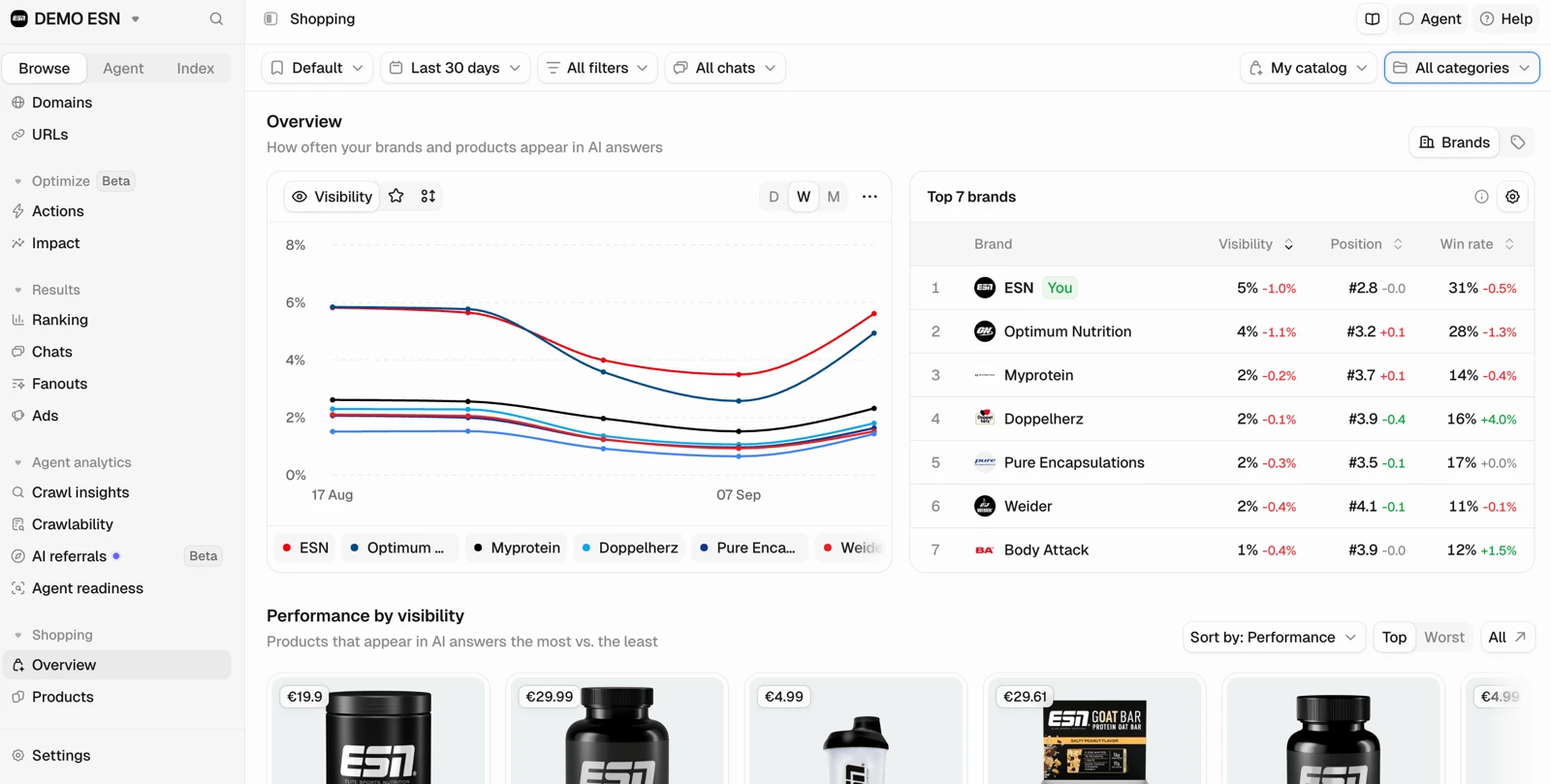
AI Shopping matches your catalog against existing chat data to show product visibility, position, win rate and competitors. The current guide explicitly says this is based on ChatGPT; other general brand-tracking models should not be assumed to have equivalent shopping coverage. Catalog accuracy and product matching are essential before trusting SKU-level conclusions. [9]
9. Own-site analytics: separate bots, answers and visitors
The current plan table lists crawlability, AI referrals, crawl insights and provider integrations. Referral documentation connects identifiable AI traffic with GA4. Bot access logs describe crawler visits, not customer visits or proof of use in an answer. Verify integration coverage, consent requirements, retention and permissions before connecting site data. [1] [12]
How to read Peec AI’s metrics without overstating the result
The dashboard’s useful precision depends on keeping the denominator, collection method and time window visible. These distinctions come from the current performance reference and pricing table. [3] [1]
| Signal | What it helps answer | Do not infer |
|---|---|---|
| Visibility | How often the brand appears in monitored answers. | All-market awareness or a guaranteed endorsement. |
| Share of voice | Brand mentions relative to tracked brands. | A score comparable across different competitor sets. |
| Position / win rate | Placement and first-place appearances in the sample. | A fixed Google-style rank for every user. |
| Retrievals | Which sources were used during answer construction. | That each retrieved source was explicitly cited. |
| Citations / prose links | Explicit source references vs. URLs written into the answer. | That either necessarily generated a click. |
| Prompt volume 1–5 | Relative topic demand for prioritization. | Exact monthly AI query volume. |
| AI referrals | Identifiable visits from AI assistants in connected analytics. | All AI influence or incremental revenue. |
| Action impact | Relative expected opportunity among tasks. | Guaranteed causal visibility lift. |
Our reporting rule: include models, countries, dates, prompt set and response count with every chart. Preserve a baseline and inspect raw answers when an apparent improvement occurs. Changing prompts, model mix or competitor aliases can change a metric without changing what a buyer experiences.
Use LLM citation analytics to translate source observations into research—not unsupported causal claims.
Peec AI pricing in November 2026: compare capacity, not only price
The public brand page displays these monthly prices. The current comparison table gives more detail than some headline cards; confirm the exact account entitlements at checkout, particularly country coverage and integrations. Enterprise is a custom annual offer. [1]
| Plan | Price | Tracking | Other limits |
|---|---|---|---|
| Starter | $95/month | 50 prompts × 3 models; daily; 4,500 answers/month | 1 project; table lists 1 country; 500 Agent credits; no API. |
| Pro | $245/month | 150 prompts × 3 models; daily; 13,500 answers/month | 2 projects; table lists 3 countries; 750 Agent credits; API included. |
| Advanced | $495/month | 350 prompts × 3 models; daily; 31,500 answers/month | 5 projects; table lists 3 countries; 1,000 Agent credits; Data Studio connector. |
| Enterprise | Custom annual | Custom coverage; daily/weekly; up to 26 models advertised | Unlimited projects in public table; SSO and custom support; confirm contract scope. |
Available models vs. active models
Starter, Pro and Advanced choose three from the public non-Enterprise list: ChatGPT, Perplexity, Google AI Overviews, Google AI Mode, Gemini, Naver AI Briefing, ERNIE (Baidu) and Bing AI Mode. Enterprise adds API-based options and advertises up to 26. Do not treat a consumer interface and a model API as interchangeable measurements, or assume all available models are active in the base subscription. [1]
Two budgets: prompt tracking and Agent usage
The quoted answer allowances correspond to a 30-day calculation: for example, 50 × 3 × 30 = 4,500. The project guide says credit allocation varies by model, web UI/API method and frequency, with daily ChatGPT at 30 credits per prompt/month and weekly at 10. Agent credits are separately listed; higher Agent quality tiers increase consumption. Use the actual allocation table and usage estimate rather than assuming one universal cost. [8] [7]
Agency plans use shared allocations
The agency page displays Essential at $245/month with 10,000 credits, Growth at $495 with 25,000 and Scale at $795 with 65,000. Comprehensive is custom annual. Its example configurations are explicitly illustrative: prompt capacity changes with active models and tracking frequency. The project guide describes agency Pitch projects lasting seven consecutive days. Confirm live-client project allowances and the cost of your specific mix. [2] [8]
A practical quote should list each client’s prompts, country/model choices, reporting needs and frequency. Spare shared credits are not the same as unlimited client seats, active projects or identical API-model costs.
What to verify before paying
MCP is included across the current brand table; API starts on Pro and the Data Studio connector on Advanced. Do not infer that every external assistant or report connector has identical permissions. Public paid-plan tables do not establish a universal trial duration or card policy, so check the signup offer and renewal/cancellation conditions directly. [1]
Explore Peec AI & its plansPros and limitations: our editorial assessment
Reasons to shortlist
- Visible daily-tracking plans with clear prompt/model/project counts.
- Raw chats and distinct retrieval, citation and link signals support investigation.
- Actions turns findings into an accountable work queue.
- Content editing and Agent assistance go beyond passive analytics.
- MCP is listed across plans; API and reporting have explicit tier boundaries.
- Separate agency allocations can fit different client requirements.
Reasons to hesitate
- Three active models on non-Enterprise brand plans may not cover your whole audience.
- Consumer-interface and API measurements need careful comparison.
- Tracking allocations and Agent usage require separate budgeting.
- Shopping is currently documented around ChatGPT, not every engine.
- Plan tables, headline cards and broad guides can require entitlement clarification.
- Independent accuracy, support and ROI are unverified in this review.
These judgments describe documented scope and buying trade-offs, not personal experiences of bugs or customer support. We avoid unverified review counts, awards-based superiority and fabricated “hours tested.” A useful pilot matters more than a feature-count contest.
A practical 30-day Peec AI evaluation plan
Illustrative workflow—not an AIToolRush case study. Imagine a B2B software team monitoring one commercially important category. The objective is to validate useful decisions and manageable consumption, not promise a revenue result within a month.
Week 1: define a stable, meaningful baseline
Choose customer questions from sales and support; separate brand-name, category, comparison and implementation intent. Confirm competitor aliases and select models/countries within your plan. Tag the sample, capture initial answers and preserve the configuration. A low starting score is useful information, not a reason to remove the difficult prompts.
Week 2: map source gaps to actual tasks
Inspect model/topic differences, then open raw chats and exact retrieved/cited URLs. Identify whether a gap relates to accessible owned content, an influential comparison source or an inaccurate claim. Review Actions evidence and accept only work with a clear owner, business relevance and achievable scope.
Week 3: ship a small number of reviewed changes
Use content optimization for a relevant document or comparison page. Supply missing facts, reject unsupported rewrites and export after editorial review. Implement the changes on your website separately and record the actual date. For third-party sources, pursue factual corrections or appropriate editorial engagement—not paid mentions disguised as independent recommendations.
Week 4: evaluate repeatability and operational value
Compare the same prompts, models and period lengths, inspect changed answers and check whether movement repeats over multiple runs. Keep referral visits separate from mention/citation trends. Review Agent consumption and the time spent shipping work. Confirm that client reports are based on the intended filters and that the recipients understand the measurement limits.
A defensible early success criterion: the team can trace a raw-answer/source finding to an approved action, implement it and monitor the relevant slice without ambiguous reporting or unexpected usage. Thirty days tests workflow fit; it rarely establishes durable causal revenue impact.
Prepare with our prompt-selection framework and AI search visibility playbook.
Peec AI vs. Profound, AthenaHQ, Nightwatch and Semrush
Compare the recurring job, matched collection scope and total cost—not an unsupported accuracy winner. The same engine label may hide a different interface, search mode, sampling method or geography.
Peec AI vs. Profound
Peec gives teams published brand pricing and a daily-monitoring/action workflow. Profound is worth shortlisting for an owned enterprise program spanning demand research, own-site analytics and marketing agents. Compare raw evidence access and actual workflow/usage packages before deciding that the larger platform is more useful. Read the Profound review.
Peec AI vs. AthenaHQ
AthenaHQ offers a free credit entry point and a different credit-based discovery/monitoring structure. Peec’s daily brand plans make prompt/model counts visible; both have action features worth demonstrating. Compare advanced targeting, claim-checking and reporting entitlements, not just stored prompts. Read the AthenaHQ review.
Peec AI vs. Nightwatch
Peec is a dedicated AI-search workflow; Nightwatch is a candidate when traditional rank tracking and AI visibility belong in the same SEO toolkit. Verify AI-specific location behavior separately from conventional rank-tracking geography, and test the relevant response allowances. Read the Nightwatch review.
Peec AI vs. Semrush and AIclicks
An existing Semrush team should compare its current AI offering before adding a specialist platform. AIclicks is another candidate for monitoring plus content work. Peec is not a replacement for every backlink, technical audit or conventional ranking task. Compare current packages and the implementation work each enables. Read the Semrush review or the AIclicks review.
For the broader shortlist, see our AI search visibility tools comparison.
Questions to answer before buying Peec AI
- Collection: Which interface/API, search mode and geography apply to each selected model?
- Evidence: Can we open full answers, timestamps, retrieved URLs, explicit citations and prose links?
- Capacity: How are prompts split across projects and countries? What changes if we add models or switch methods?
- Agent economics: What do credits buy, how do quality tiers affect use, and what happens when the balance runs out?
- Action quality: Can the demo connect a relevant answer to a specific, feasible task with an owner?
- Content: Can we review/revert drafts and restrict editing permissions? Who publishes exported changes?
- Shopping: How is our catalog matched, and which recommendation surfaces are actually captured?
- Reporting: Which API endpoints, quotas, MCP permissions and connector/export options are included?
- Agency fit: What are live-client, pitch-project and viewer allowances under our chosen allocation?
- Governance and exit: Verify security documentation, retention, uploads, client isolation and useful exports before renewal.
Decision rule: buy the smallest configuration that supports a real research-to-action loop. Upgrade for a demonstrated model, reporting or capacity need—not because more prompts might make an executive chart look impressive.
Peec AI review: frequently asked questions
Sources, evidence and editorial methodology
This review was researched against Peec AI’s official pricing and documentation on November 21, 2026. Facts are attributed inline. Images are official documentation captures, including a still from a walkthrough, with vendor example data. They do not show our test account or independently measured performance.
We assessed scope, metric clarity, capacity economics and practical workflow fit. We did not access a paid account or audit accuracy, support, security controls or revenue lift. Workflow examples are illustrative; no invented rating or ROI claim is included. This fact-check date records research, not automatic monthly re-verification.
Documentation can span broader capabilities than a particular purchased plan. The current pricing table is the buying baseline; confirm account-specific model access, add-ons, trial terms and contract conditions directly. Named API models may evolve, so check the available channels rather than relying on a static list indefinitely.
- Peec AI brand pricing
Current plans, prompts, active models, projects, API/MCP, agent credits and feature entitlements.
- Peec AI agency pricing
Agency credit pools and illustrative model/frequency configurations.
- Understanding your performance
Dashboard metrics, filters, raw chats, links, sources and query fanouts; official walkthrough image.
- Understanding sources
Retrieved sources, domain/URL analysis and citation investigation.
- Actions
Evidence-backed recommendations, workflow statuses and relative impact; official screenshot.
- Content optimization
Editable drafts, suggested rewrites, owner permissions, MCP editing and export.
- Peec Agent
Context-aware analysis, skills and quality tiers; distinct from Agent Analytics and raw chats.
- Manage your project
Credit allocation, model/tracking-method costs and agency pitch projects.
- AI Shopping overview
Product-level metrics based on ChatGPT chat data; official shopping screenshot.
- Fact-checking
Claims compared with brand facts and the scope of selected prompts.
- MCP Server
Analysis and management through connected AI assistants.
- AI referrals
Identifiable AI referral traffic from connected GA4 data.
See our review methodology and affiliate disclosure. Found a change? Send a correction.
The bottom line: reporting is useful when the work gets done
Peec AI’s strongest case is its connected workflow: monitor a meaningful sample, inspect the answers and sources, prioritize an Action and produce a reviewed change. Its current Agent and editing features make it more than a passive visibility dashboard.
Our recommendation: shortlist it for a team or agency that can own that loop. Validate model coverage, raw evidence, actual credits and reporting entitlements with one real category. Keep citations, visits and conversions separate, and judge the pilot by useful work delivered—not only a rising score.