TECHNICAL SEO · SOURCE-VERIFIED REVIEW
Screaming Frog SEO Spider Review: Is It Worth It in 2026?
A specialist crawler remains useful even when SEO suites promise to do everything. Screaming Frog helps you inspect what a website actually serves, trace technical problems to their source and verify a fix. Its newer AI workflows add classification and semantic analysis—not automatic rankings. Here is where the free version is enough, what the annual licence unlocks and how to turn crawl data into meaningful work.

Lead SEO & AI Specialist · 13+ years in SEO
Published & fact-checked November 21, 2026 · 21 min read
In this review
The short answer: a compelling specialist for teams that implement technical fixes
Shortlist Screaming Frog when you need controlled technical audits, migration checks, custom extraction or repeatable verification. The free version is valuable for basic checks on a small site; the paid licence is easier to justify when saving, rendering, comparisons or integrations are recurring needs. It is less suitable as your only tool if the main requirement is competitor keyword research, backlink discovery or ongoing AI brand monitoring.
- Best fit
- Technical SEOs, agencies, developers and site owners with an implementation workflow.
- Standout use
- Find the affected URLs → trace causes → export evidence → fix → recrawl.
- Main buying risk
- Assuming “unlimited” includes hardware, API credits or automatic implementation.
Evidence note: This is an official-documentation evaluation, not a hands-on paid-account benchmark. We have not measured crawl speed, AI accuracy, support quality or traffic uplift. The judgments and examples below are editorial analysis; no fabricated testing hours or numeric review score are used.
This review belongs to our AI SEO tools category. Traditional technical SEO is the focus; AI/GEO capabilities are assessed as supporting workflows rather than a replacement for crawling fundamentals.
What is Screaming Frog SEO Spider—and what is it not?
SEO Spider is a downloadable crawler for Windows, macOS and Linux. You start from a URL or supplied list and inspect fetched pages, links, resources and extracted signals. The vendor advertises over 300 SEO issues, warnings and opportunities; that is a vendor feature claim, not our independent count or proof of complete coverage. [1]
A crawler answers “what did this configuration discover and receive?” A search-performance tool answers “what search activity did we observe?” A backlink database answers “which external links are in this vendor's index?” Those are different datasets. Fetching a competitor's website does not reveal its private conversions, historical rankings or all its incoming links.
Its desktop model puts execution and storage under your team's control, but also makes the team responsible for hardware, files, configuration and scheduled-machine availability. It is not a managed cloud campaign simply because a crawl can run on a schedule. The separate Log File Analyser is not included by implication; its licence is distinct. [5] [7]
Technical SEO features: from a URL list to an actionable diagnosis
1. Broken links and redirects: find the cause, not just the status code
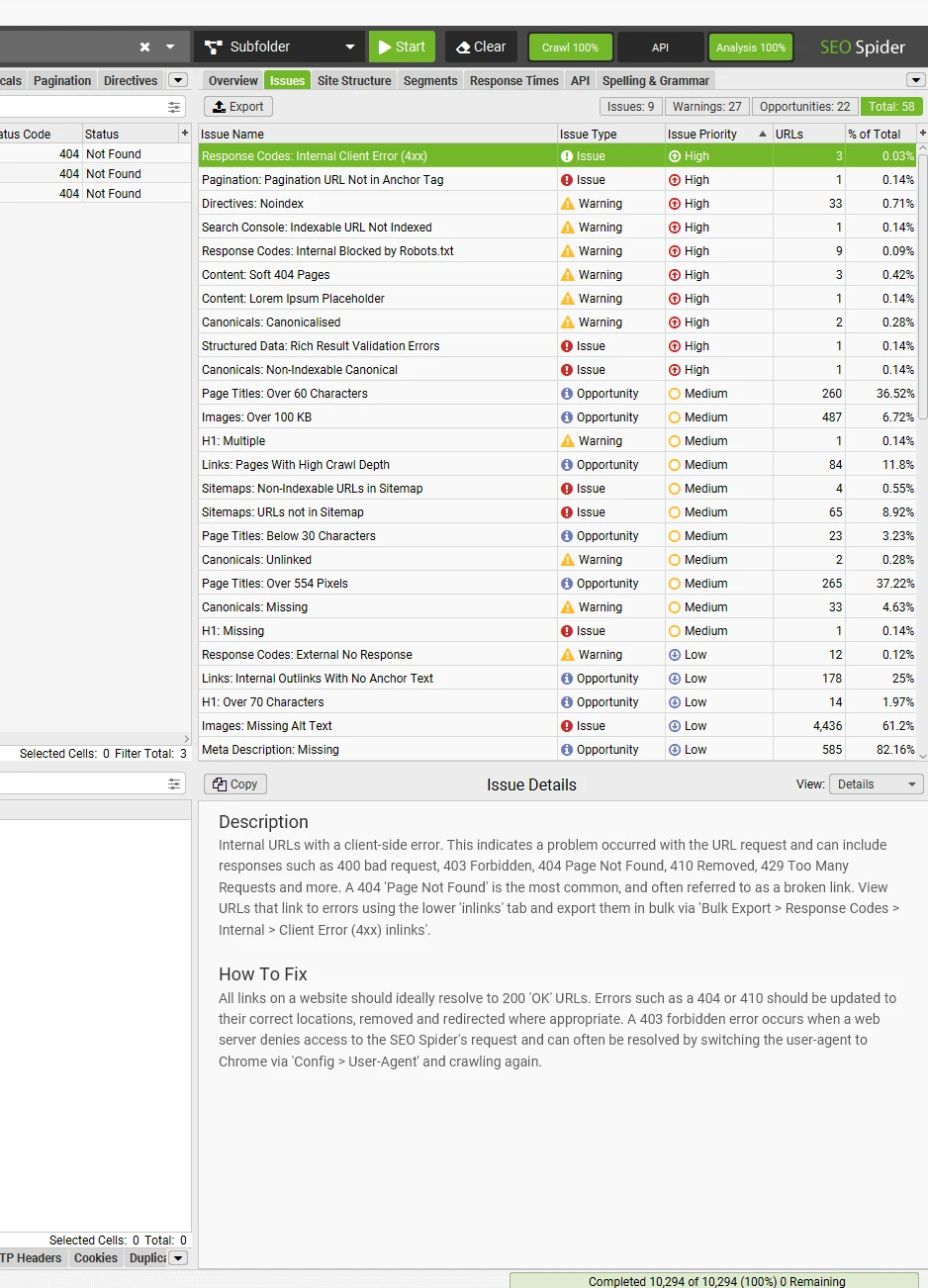
SEO Spider finds 404s, server errors, temporary/permanent redirects, chains and loops. Inlink data and exports help identify which pages contain the problematic reference. For migrations, a supplied URL list can test old destinations rather than relying only on links discoverable on the new site. [1] [5]
Useful decision: prioritize a broken link in navigation or a revenue-generating category before an intentionally removed archive URL. A 404 is not universally a mistake, and a 301 is not universally a problem. Inspect the old page's purpose, the proposed destination and whether users receive an appropriate replacement. Fix internal links to the intended final URL where practical.
2. Canonicals, robots and indexability: separate intent from accidents
The crawler exposes canonical tags, robots.txt restrictions, meta robots and X-Robots-Tag directives. These help identify template errors such as a production page canonicalizing to staging, a useful category marked noindex or conflicting directives. What appears in your crawl depends on scope and settings. [1] [5]
Review status, directive, canonical target and internal links together. “Indexable” means the tool found no disqualifying signal under its configured analysis; it does not establish Google has indexed the page. Robots blocking can prevent fetching content or directives. Do not remove deliberate restrictions on private, duplicate or filtered pages simply to reduce warnings.
3. Titles, descriptions and duplicate content: diagnose the template
Core checks find missing, repeated or unusually sized titles and descriptions, headings and exact duplicate content. Paid features add near-duplicate and semantic workflows. Separate repeated metadata from identical main content: several pages can share a title while having different content, and apparently different pages can still satisfy the same intent. [1] [2]
Cluster findings by template and business role. Fifty product pages with a missing title may be one CMS rule, not fifty unrelated editorial tasks. A length warning is not a universal search-display rule; ensure the title explains the page accurately. Near duplicates need a reasoned consolidation, canonical or differentiation decision, not automatic deletion.
4. Internal linking, architecture and orphan-page investigation
Inlinks, outlinks, crawl depth and visualizations help expose how the crawler reaches important sections. Investigate a commercial page reachable only through a long chain, inconsistent navigation or links pointing to noncanonical destinations. Crawl depth describes a route from the selected starting point, not a fixed quality score. [1] [5]
A disconnected page cannot be found through links that do not exist. Combine crawl evidence with sitemaps, supplied URLs and eligible analytics/Search Console data to investigate potential orphans. A URL absent from one crawl can also be excluded by configuration, blocked, redirected or temporarily unavailable. Confirm the cause before declaring the page orphaned.
5. JavaScript rendering: compare delivered HTML with the rendered page
Paid Chromium-based rendering supports JavaScript-rich websites. Documentation includes render wait, screenshots, JavaScript errors and advanced rendering controls. Start with representative templates and verify the title, canonical, main content and navigational links actually appear. [1] [5]
Compare a small HTML-only crawl with a rendered crawl to find material differences. Check timing, blocked resources and authentication rather than assuming the framework name proves a problem. Rendering adds processing and storage overhead. A successful local render is useful diagnostic evidence, not a guarantee Google's renderer sees identical content or chooses to index it.
6. Custom extraction: audit the facts that matter to your website
Paid custom search/extraction can collect values through CSS selectors, XPath or regex; custom JavaScript is also listed. Example jobs include extracting product SKUs, prices, publication dates, author attribution or specific markup fields. Sample the extracted values before trusting a full export. [1] [2] [5]
For an affiliate publisher, a useful audit compares visible prices, canonical URLs and declared update dates across templates. Write down what constitutes an exception, then inspect exceptions against primary sources. Extraction proves what the website contains; it does not prove the price is current or the author's claim is true.
7. Structured data, hreflang, accessibility and performance
Core hreflang auditing supports international checks. Paid structured-data validation, mobile usability, accessibility auditing and PageSpeed Insights integration extend the analysis. Use template-level patterns to create a manageable fix queue. These are distinct capabilities, not proof of complete accessibility compliance or rich-result eligibility. [2] [5]
Match schema to visible content and supported search features; verify representative URLs in Google's tools. For international pages, inspect reciprocal references and destination status as well as markup presence. For accessibility, include human keyboard and assistive-technology checks. For performance, distinguish collected lab diagnostics from field-user experience and account for external API quotas.
8. Integrations, comparisons, sitemaps and exports
Paid Google Analytics, Search Console and PageSpeed Insights connections enrich URL evidence with first-party or diagnostic data. Saving/opening crawls and comparison support change tracking; staging comparisons can use URL mapping. XML sitemap generation is available in the core feature set, with configurable inclusion rules. [1] [2] [5]
Choose consistent periods and URL normalization before joining data. Zero reported clicks is not proof a page has no value, and a missing joined row can be a property or configuration mismatch. Keep only intended canonical, indexable pages in a sitemap; generating a file does not submit it, repair pages or force indexation. Preserve raw evidence and configurations alongside the final report.
AI integrations, semantic analysis and GEO: useful assistance with clear boundaries
Run prompts against selected crawl data
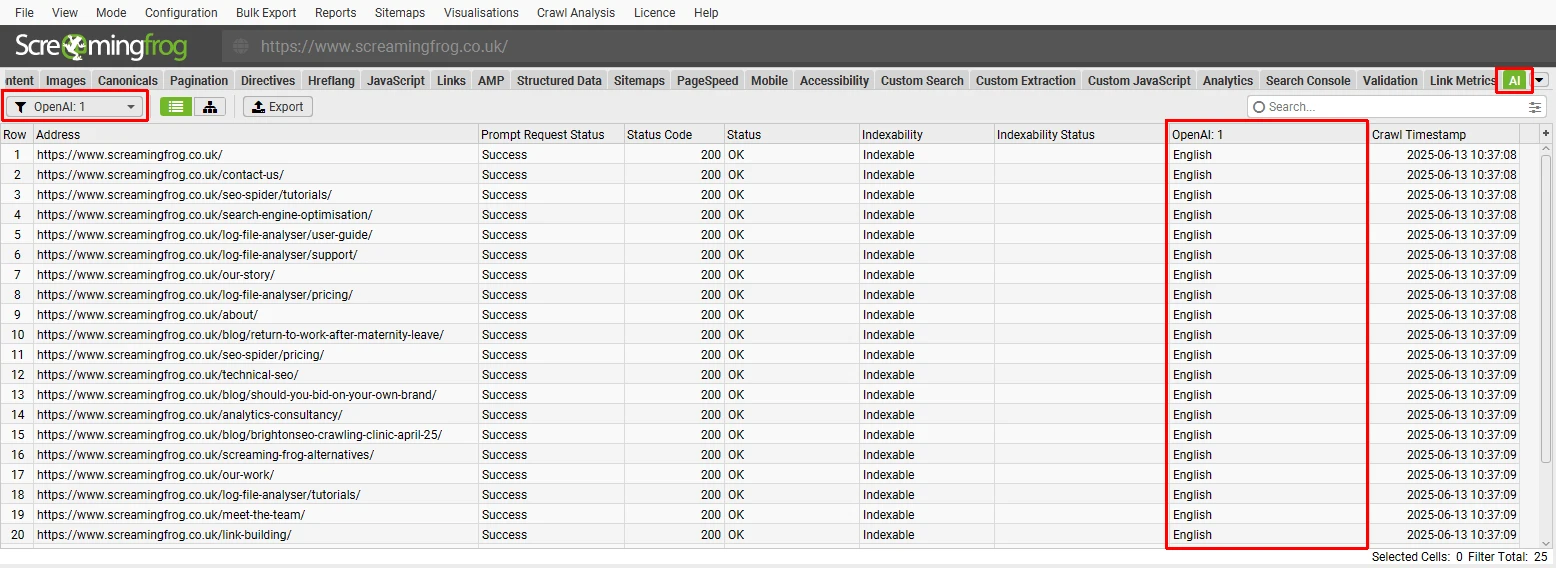
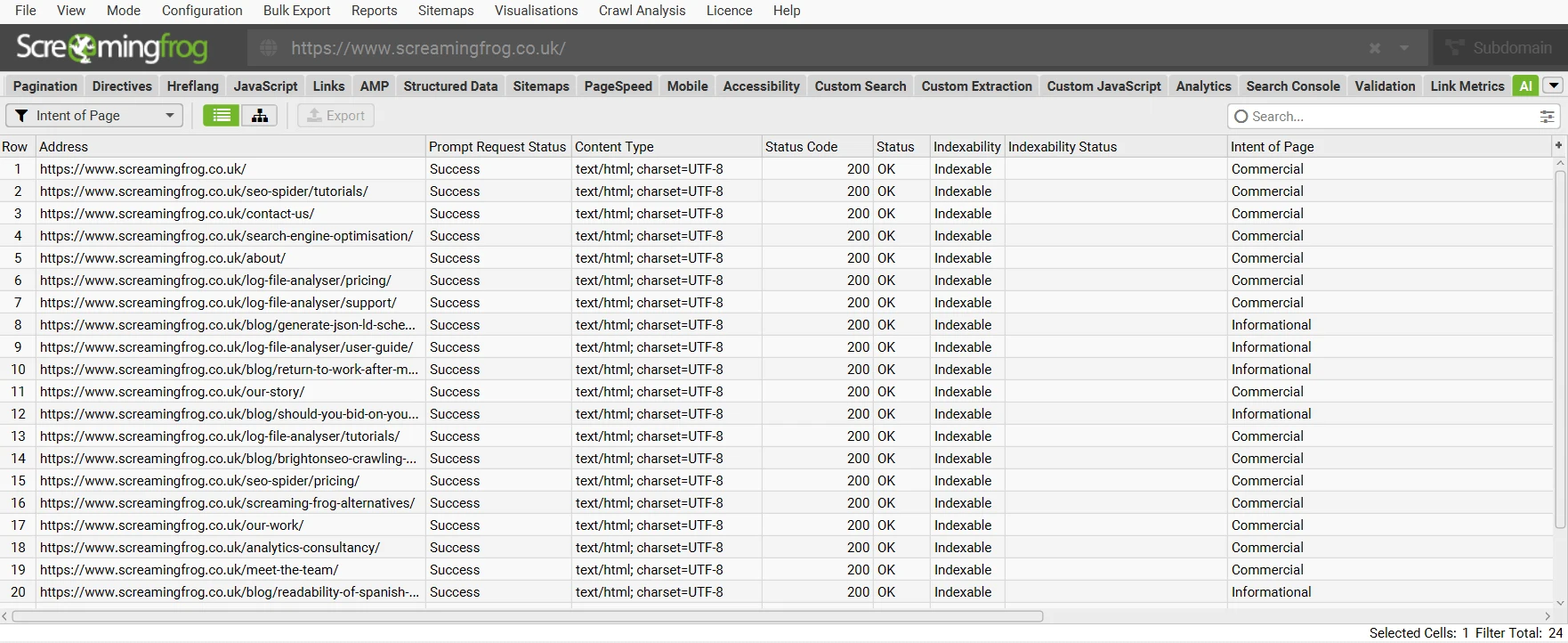
The official tutorial supports OpenAI, Gemini, Anthropic and local Ollama, plus compatible custom endpoints. Prompts can classify language, intent or sentiment, extract entities, draft metadata or alt text and generate embeddings. A paid licence unlocks the integration; it does not include unlimited third-party inference. [2] [6]
A sensible first use: classify a small, reviewed set of pages into known intent categories, then investigate inconsistent templates. Supply clear label definitions, appropriate page text and an expected output format. Test before expanding, retain failures and compare a manually labeled sample with the returned classifications.
Semantic similarity is not a cannibalization verdict
Embeddings and content clustering can surface semantically related pages worth investigating. Similarity is not proof that two pages compete for the same search intent or should be merged. Inspect content purpose, query overlap, performance, conversion role and internal links before consolidating. A similarity threshold is a modeling choice, not a Google rule. [2] [6]
Control costs and review generated changes
The tutorial includes prompt testing and targets tied to segments or issues. Run metadata generation only for the relevant missing fields rather than blindly against the entire crawl. Provider costs depend on requests, tokens, models and retries; rate limits can constrain throughput. Ollama avoids a paid cloud API requirement but has local compute and quality trade-offs. [6]
An illustrative 8,000 eligible pages with three prompts creates about 24,000 prompt executions before retries. Filtering to 400 pages with missing descriptions reduces a single-prompt job to about 400 executions. Those are workload examples, not a price quote: context size and model choice determine the bill. Review factual claims and avoid producing generic alt text or misleading descriptions at scale.
What this means for GEO/AEO
Accessible content, coherent canonicals, useful structure and clear facts benefit a website's technical foundation. SEO Spider can investigate those prerequisites. It does not establish that ChatGPT mentions your brand or cites your pages. A prompt analyzing your HTML is different from a captured answer to a buyer question; an API-generated answer is not automatically the consumer chatbot experience.
For answer monitoring use our AI visibility tools guide or Semrush AI Visibility Toolkit review. Read LLM citation analytics explained to distinguish mentions, linked citations and actual referrals.
Scheduling, CLI and MCP do not remove operational responsibility
Paid features list scheduling, command-line automation, email exports and an MCP server. The machine, licence, permissions and relevant services must be available. Confirm current MCP setup and supported operations in the installed-version documentation; the pricing-page listing alone does not establish every assistant action or security control. [2] [5]
Start with saved configurations and read-only exports. Check exit status, crawl completion and empty/error outputs rather than treating a scheduled launch as success. Keep private credentials out of shared profiles and prompts, constrain assistant access and retain human approval for production changes. These are operating recommendations, not automations deployed or benchmarked by this review.
How to interpret crawl evidence without overclaiming
| Signal | Useful question | Does not establish |
|---|---|---|
| HTTP status | What did this request receive? | Every user's experience or permanent availability. |
| Indexability / canonical | Which signals did the crawler detect? | Actual Google indexation or canonical selection. |
| Crawl depth / inlinks | How did this configuration reach the page? | A universal ranking score or all possible routes. |
| Duplicate / semantic similarity | Which pages deserve intent review? | An automatic merge or deletion decision. |
| Schema validation | Where may markup need investigation? | Guaranteed rich results or policy compliance. |
| AI classification / generated text | Which model outputs need review? | Verified facts, actual citations or ranking uplift. |
| Joined Search Console clicks | What did the selected property and period report? | All-channel conversions or tool-caused growth. |
Record starting URLs, date, user agent, render mode, limits, exclusions and integration periods. A reduction in warnings is only comparable when scope and analysis remain comparable. Crawling fewer pages or excluding a problem template can improve the apparent report without improving the website.
Prioritize impact × affected template × confidence. A blocked commercial section with clear evidence can outweigh hundreds of cosmetic metadata warnings. Verify changes through a controlled recrawl, representative manual inspection and relevant Search Console/analytics data, not the issue count alone.
Screaming Frog pricing: free vs. paid, annual licences and real costs
The free version has a 500-URL cap; the annual paid licence is £199/user, or $279 in the vendor's USD offer. These are published currency prices—not “approximately $279” converted from GBP. Licences last one year and require renewal for continued licensed access. Check taxes and the purchased currency before payment. [2] [3] [4]
| Version | Price | Scope |
|---|---|---|
| Free | $0 | 500 URLs per crawl; core checks; no saving, rendering or AI integrations |
| Paid licence | £199 or $279/user/year | No licence-imposed URL cap; advanced features; hardware and external API limits still apply |
| Capability | Free | Paid licence |
|---|---|---|
| Crawl URL cap | 500 | No licence-imposed cap; resource-dependent |
| Broken links, redirects, metadata, exact duplicates | Included | Included |
| Robots/directives, hreflang, XML sitemap, visualizations | Included | Included |
| Save/open crawls and advanced crawl configuration | Not included | Included |
| JavaScript rendering and crawl comparison | Not included | Included |
| Near duplicates, semantic clustering, structured-data validation | Not included | Included |
| Custom search/extraction/JavaScript and accessibility auditing | Not included | Included |
| Analytics, Search Console, PSI and AI integrations | Not included | Included; external requirements apply |
| Scheduling, command line, MCP and email exports | Not included | Included; setup required |
The free version is not a full-feature trial. A 150-page JavaScript site can require paid access for rendering despite fitting under 500 URLs. A small migration can require saving and comparison. A larger site's HTML/resource mix can also reach the URL cap before every intended content page is covered. Inspect coverage rather than equating the allowance to 500 complete HTML pages. [2]
Bulk pricing and per-user licensing
| Licences purchased together | GBP per user/year | USD per user/year |
|---|---|---|
| 1–4 | £199 | $279 |
| 5–9 | £189 | $265 |
| 10–19 | £179 | $249 |
| 20+ | £169 | $235 |
The official FAQ permits one user to use their licence on multiple devices; it does not permit different people to share it. For illustration, five licences at £189 each cost £945 yearly before applicable taxes; five USD licences at $265 cost $1,325. Do not choose a larger band unless you need the users. [3] [4] [7]
“Unlimited” is not a hardware or AI allowance
A paid licence removes the software's 500-URL cap, not RAM, storage, render time or site load constraints. External APIs have their own quotas, usage charges and terms. Include hardware or hosted-machine costs, API spend, analyst time and the cost of implementing fixes in your budget. A low licence price alone does not establish positive ROI.
£199/year is about £16.58/month as budget arithmetic; $279/year is $23.25/month. Neither is an advertised monthly payment plan. We have not established an automatic-renewal, cancellation or refund promise from the reviewed feature pages. Confirm the current checkout terms, renewal process and tax treatment; do not infer cancel-anytime or refunded unused time.
Explore SEO Spider & free downloadHardware, privacy and safe crawl setup
Large crawls require deliberate memory and storage choices. The guide documents memory allocation and storage configuration; rendered content, stored HTML, screenshots, extraction and AI work can add substantial overhead. Test a representative subset on your machine before promising a full-site overnight audit. There is no defensible universal pages-per-GB or speed estimate without a defined workload. [5]
Control the scope: decide whether to include subdomains, query parameters, faceted navigation and external resources. Constrain crawl traps, infinite calendars and session URLs. Use appropriate speed and robots handling and coordinate sensitive staging/production audits with the site owner. A diagnostic crawl should not become a load test accidentally.
Privacy: local crawling is not a blanket guarantee that data stays local. Cloud AI prompts send selected inputs to the provider; analytics connectors access authorized properties; shared exports can expose private URLs or content. Use a lawful scope, least-privilege accounts and approved providers. Keep API credentials out of client deliverables and inspect sensitive text before processing it with AI.
Reproducibility: save the configuration, original crawl and exported evidence where access is controlled. A scheduled workstation must remain awake and able to write its destination. For team reporting, define ownership, naming conventions, retention and completion checks; do not assume the desktop application itself provides a managed client portal.
Pros and limitations: our editorial assessment
Reasons to shortlist
- Useful permanent free entry for core small-site checks.
- Annual per-user pricing with clear bulk bands.
- Controlled crawl, extraction and rendering workflows.
- URL-level evidence supports template and migration diagnosis.
- Saving, comparison and exports support repeatable verification.
- First-party integrations add context to technical findings.
- AI provider choice includes local-model options.
Reasons to hesitate
- Free access omits several features even small sites may need.
- Desktop resources and machine availability are your responsibility.
- Detailed controls require a defined configuration and analyst judgment.
- No equivalent broad competitor keyword or backlink index.
- Cloud AI/API charges are separate from the licence.
- Issues and AI outputs do not implement their own fixes.
- Not a substitute for actual AI answer or conversion monitoring.
These are documented scope and operating trade-offs, not claims of measured crashes, slow support or superior crawl speed. We do not convert vendor testimonials, review-site ratings or a large feature count into our own score.
A practical audit workflow: sample, diagnose, implement, verify
Illustrative evaluation—not an AIToolRush case study. Consider a 12,000-page ecommerce website with category, product and faceted-navigation templates. A free sample can establish core usability but cannot validate paid rendering, saving or comparison. Agree on licensed access before testing those jobs.
Step 1: define business priorities and representative templates
Choose key landing pages, a product family, a filtered URL, a discontinued item and a JavaScript-dependent template. Record intended status, canonical, indexing choice and conversion role. Collect sitemap URLs and first-party performance separately. Define allowed crawl scope with the developer or site owner.
Step 2: prove the crawler sees the relevant content
Run a small crawl and inspect response codes, title, main content, canonical and links against manual observations. Where necessary, compare rendering modes. Check authentication, resource errors and timing. A crawl that misses the product description or category navigation is not a valid basis for a full inventory audit.
Step 3: run the scoped audit and group actionable exceptions
Exclude known traps without hiding business-critical templates. Join appropriate first-party data, then group blocked pages, canonical conflicts, broken navigation and duplicates by cause. Pick a small backlog with evidence, expected benefit, affected URLs, owner and acceptance criteria. Do not forward every warning as an urgent development task.
Step 4: test one AI or extraction job before expanding
Extract prices or classify a reviewed sample if that answers a real question. Check correctness, missing fields, API counters and failure behavior. Limit generation to the relevant subset and keep human approval for changed facts. A successful export is only useful if its values mean what you think they mean.
Step 5: implement and verify the affected template
Release the approved fix through normal review. Recrawl the affected URLs under the same settings and compare saved evidence. Inspect representative pages and redirects manually, check for unintended indexing changes and annotate the release in performance reporting. Do not change crawl scope just to produce fewer errors.
Step 6: report operational outcomes before claiming growth
A useful early result is a verified root cause, an implemented template fix and a reproducible check showing the intended behavior. Search traffic and conversions need a longer observation window and competing explanations. The licence enables diagnosis; the team creates value by acting on defensible evidence.
Screaming Frog vs. Semrush, Ahrefs, SE Ranking and content tools
Screaming Frog vs. Semrush: specialist investigation vs. a broader campaign suite
Choose based on the recurring job. SEO Spider is a candidate for controlled crawling, extraction and migration evidence. Semrush adds competitor keyword/page research, backlink analysis and ranking campaigns. A specialist crawler can complement the suite; do not pay for a broad recurring subscription solely to solve one technical question. Our Semrush SEO review explains crawl budgets, rendering tiers and current pricing.
Screaming Frog vs. Ahrefs Site Audit: compare your real templates
Ahrefs combines audit functionality with keyword and backlink research. Compare crawl coverage, rendering, controls, exports, history and the full seat configuration on the same representative pages. A feature list does not establish a universal accuracy winner. Read our Ahrefs SEO review for plan and credit distinctions.
Screaming Frog vs. SE Ranking: diagnostics vs. everyday multi-site operations
SE Ranking is worth comparing when daily ranking campaigns, competitor research and client reporting are required alongside audits. SEO Spider's annual licence may suit a separate technical workflow but does not supply those campaign datasets. Match the actual users, projects, crawl scope and reporting needs. See the SE Ranking review.
Screaming Frog vs. Surfer, Clearscope or Frase: different bottlenecks
A content editor can improve briefs and editorial reviews; it does not replace tracing a redirect loop or auditing a migration. A crawler can expose missing fields but does not provide the same writer handoff. Compare Surfer, Clearscope and Frase when content execution is the recurring problem. Avoid adding overlapping subscriptions without separate owners and jobs.
Screaming Frog vs. Search Console, logs and AI visibility platforms
Search Console supplies Google's property-level evidence; server logs describe actual requests; a configured crawler performs its own fetches. None replaces the others. Dedicated AI visibility tools observe answer samples, while SEO Spider's model integrations analyze crawl data. Use our AI visibility vs. rankings guide to preserve those distinctions.
For a wider shortlist, visit the AI SEO tools comparison guide and Semrush alternatives.
Before buying: the Screaming Frog evaluation checklist
- Job: Is the recurring need crawling/extraction, or competitor research and ranking campaigns?
- Free eligibility: Does the sample fit 500 URLs, and can you complete the job without saving or paid features?
- Rendering: Does a representative template need Chromium rendering, and are content and links actually captured?
- Scope: Have you controlled facets, parameters, subdomains, staging and crawl speed?
- Hardware: Can the machine handle the intended storage, rendering and AI workload?
- Users: Does each person have a licence, and is a bulk band relevant?
- Integrations: Are property permissions, join rules, date ranges and API quotas correct?
- AI: Is the provider approved, is spend bounded and is output reviewed?
- Automation: Who checks completion and failures, and where are files retained?
- Commercial terms: Have you confirmed currency, taxes, renewal and refund conditions?
- Implementation: Who owns fixes and verifies changes after release?
Screaming Frog review: frequently asked questions
Sources, evidence and review methodology
This review was researched against the official product, pricing, licence, user-guide and AI tutorial pages on November 21, 2026. Product capabilities are cited inline. Screenshots are official documentation illustrations and may show an earlier release; they are not our measured crawl results. We assess scope, pricing clarity, technical workflow and buying risks, not independently measured speed or AI accuracy.
We did not use a paid account, benchmark competing crawlers, test support or measure a ranking uplift. Examples are explicitly illustrative; no fabricated ROI, testing hours or aggregate review rating appears here. The fact-check date records actual research, not automatic monthly re-verification. Current checkout terms and version-specific settings take precedence over a historical screenshot.
- SEO Spider product overview
Operating systems, vendor's 300+ issue claim, core crawling, redirects, rendering, visualizations and comparisons.
- Free vs. paid feature comparison
500-URL free cap, annual licence, advanced feature gates, API integrations, accessibility and MCP listing.
- GBP licence and purchasing FAQ
£199 annual price, bulk discounts, per-user licensing and purchasing conditions.
- Official USD licence prices
$279 annual price and published USD bulk bands; not an estimated exchange conversion.
- SEO Spider user guide
Crawl scope, storage, exports, rendering controls, extraction, integrations and automation reference.
- How to crawl with AI prompts
Provider setup, prompts, testing, segmented targets, embeddings and the official screenshots reproduced here.
- SEO Spider FAQ
One licence per user, multiple-device use by the same user and common setup questions.
- Official quick-start guide
Crawl setup, issue details, exports and the official Issues-tab screenshot.
Read our review methodology and affiliate disclosure. Found a product change? Send a correction.
The bottom line: buy a repeatable technical workflow, not an error counter
Screaming Frog's case is straightforward: it helps an informed team investigate a website at URL and template level, export useful evidence and verify that a fix works. Free access is meaningful for basic small-site checks. Paid access becomes relevant for rendering, saved evidence, extraction, comparison and integrations—not only when your site exceeds 500 URLs.
Our recommendation: shortlist it for an active technical SEO process. Test real templates, control scope and resource use, give every user their own licence and budget AI/API usage separately. Choose a broad suite for research and campaigns or a visibility platform for answer monitoring. The best purchase is the one whose findings your team can actually implement.